Skip to content
Controlled reviewer sharing

Control Every Reviewer Handoff from First Access to Final Download

Give buyers, auditors, and partners a dedicated portal with tiered access, NDA gates, watermarked downloads, and full activity logs. Your team controls what each reviewer sees; they get a clean, professional experience that builds trust before they read a single document.

Share a reviewer-access scenario like an upcoming audit or buyer security review. We will show tiered access, approval gates, expiring links, and download logs end to end.
Best fit
Reviewer OperationsExpand to Risk & Accountability when the workflow broadens.

Best for controlled sharing with tiers, agreements, and logged access.

Sample output
Reviewer portal with controlled access
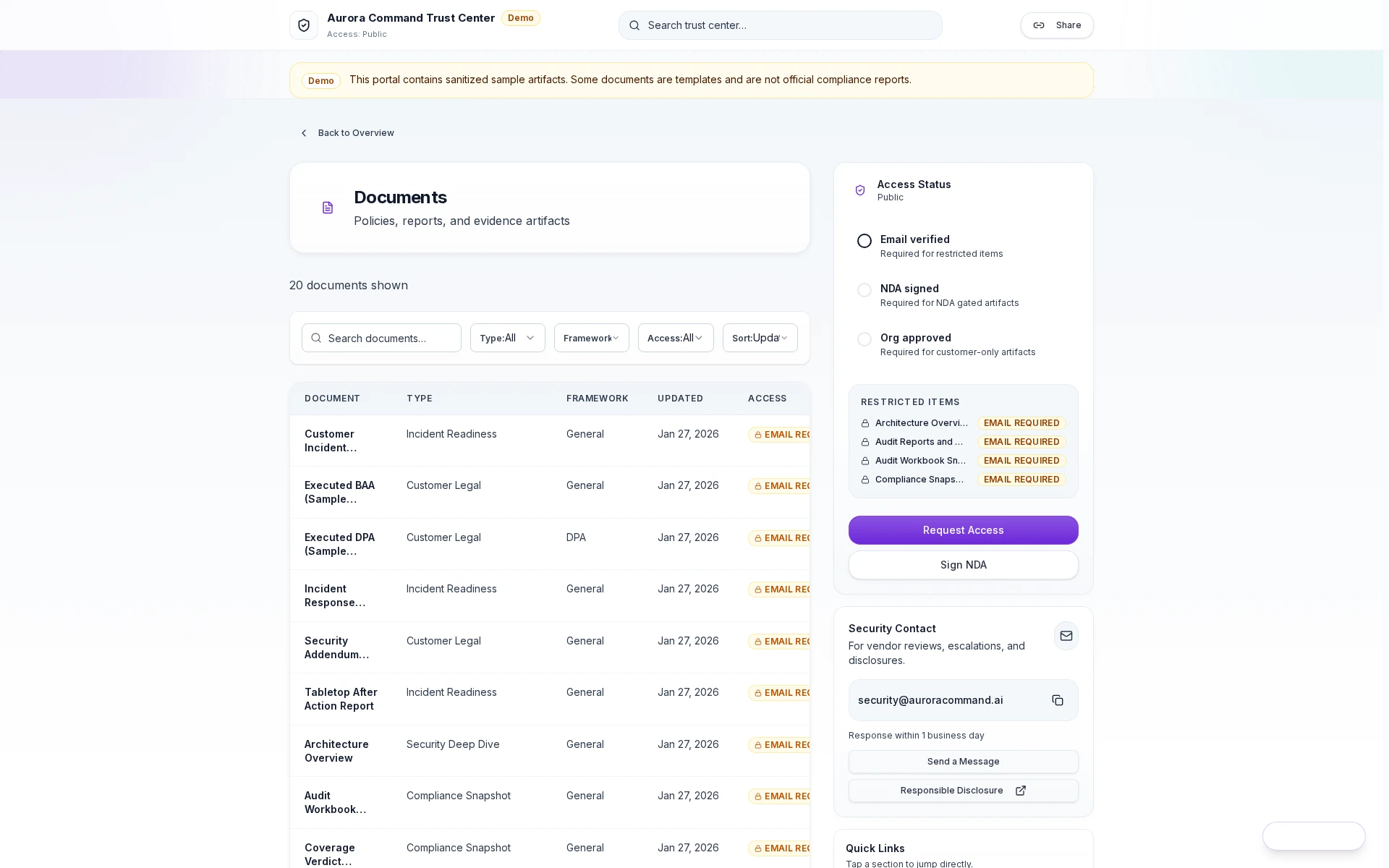
A branded portal where reviewers see only what you approve, with tiered access, expiring links, watermarked downloads, and full activity logs. Every interaction is recorded and exportable.
Tiered Sharing ControlsExpiring Reviewer AccessLogged DownloadsWatermarked Exports
Compare the handoff
Admin mode
Control who sees what before a reviewer ever clicks in.

Publish a branded trust portal with deliberate tiers, approval gates, and expiry rules so your team can hand off evidence without exposing the operating workspace behind it.

  • Tiered access and publication readiness
  • Approval gates before sensitive evidence goes live
  • A cleaner first impression than attachment chaos
Aurora Command trust centers list showing portals, access tiers, and sharing readiness

Every portal, one console

Create, publish, and manage reviewer portals for different audiences from one place.

1 of 3

How It Works

From Maintained Evidence To Controlled Reviewer Access

Route access, approvals, evidence packs, and logged handoffs to reviewers without exposing the operating workspace. Each step creates an auditable record your team can export at the next review.

01
Define access tiers by reviewer type
Set public, gated, and restricted levels by reviewer type and deal context. Buyers see marketing-safe content instantly; auditors unlock scoped evidence after email verification or NDA acceptance.
02
Curate what each tier sees
Control which policies, reports, evidence bundles, and subprocessor details appear in each access layer. Assign owners and review dates so nothing goes stale between cycles.
03
Gate sensitive artifacts with internal approval
Require team approval before sensitive documents become visible to external reviewers. SOC reports, penetration test summaries, and internal risk assessments stay draft until your team signs off.
04
Share through expiring links
Issue controlled links with expiration dates, usage caps, and optional NDA gates. Each link is traceable to the reviewer who received it and the operator who issued it.
05
Track every view and download
Monitor who viewed what, when they accessed it, which documents they downloaded, and how long they spent reviewing. Export access logs as CSV or PDF for your own compliance records.

Verified Before Review

Key Capabilities

Reviewers get what their review requires: tiered access, request flows, watermarked downloads, and a full activity history behind every handoff. Your team stays in control of what goes out and when.

Aurora Command reviewer portal showing curated evidence and request-access flow.

Reviewer-First Portal Experience

Give buyers and auditors a dedicated evidence portal with your brand, your domain, and your layout. No workspace access or email attachments needed. Reviewers land on a professional surface that builds trust before they read a single document.

What Reviewers Access Through The Trust Center
Artifacts reviewers recognize, plus sample previews of structure.
Scroll for artifact previews
Recommended fit
Reviewer Operations
Best for controlled sharing with tiers, agreements, and logged access.
Where teams expand next
  • Risk & Accountability: Add request ownership, closure evidence, and due diligence follow-through around the same reviewer motion.
  • Command: Add on-prem telemetry for procurement-heavy environments.
Need help choosing?
Compare bundles and module pricing to find the right starting point, then confirm fit in a walkthrough if your workflow is regulated or time-bound.

Common Questions

Questions Teams Ask About Reviewer Operations

Portal setup, reviewer tiers, request flows, expirations, watermarking, integrations, and what reviewers see versus what your team controls.

Do buyers and auditors count as paid seats?
No. Reviewers are viewers with controlled access. They can browse your portal, download permitted documents, and submit requests without consuming an operator seat. Operator seats are for your internal team only.
Can we create different portals for different reviewer types?
Yes. Set up separate access tiers for buyers, auditors, insurers, and partners. Each tier sees only the collections you assign to it. You can also create invitation-only deal rooms for enterprise prospects who need a curated evidence package tied to a specific opportunity.
What happens when a sharing link expires?
Access is revoked automatically. The reviewer can no longer view or download any artifacts. You can extend or re-issue links if needed. Every expiration event is logged so your team has a complete record of when access was active and when it ended.
Can we see exactly what a reviewer accessed?
Yes. Access logs show every page view, document download, time spent on each page, and which evidence bundles were opened. Logs are exportable as CSV or PDF for your own compliance records, internal reviews, or auditor requests.
How does the NDA workflow affect reviewer speed?
Click-to-accept NDAs resolve in seconds and grant immediate access to the gated tier. For enterprise deals that require wet signatures, Aurora integrates with DocuSign and Ironclad so the agreement step never leaves the reviewer's session. Routing rules pick the right flow automatically based on reviewer type.
Can we use our own domain for the Trust Center?
Yes. Configure a custom domain like trust.yourcompany.com with full brand customization: your logo, colors, fonts, background mode, and hero messaging. Reviewers see your brand, not a third-party tool. Custom CSS injection is available for pixel-perfect alignment with your design system.
What integrations does the Trust Center support?
Real-time webhooks fire for access requests, agreement signatures, and document downloads. Send events to Slack, your CRM, or any internal system. The portal also integrates with Google Workspace, Okta, Microsoft Entra, and DocuSign for authentication and agreement workflows.
How do watermarked downloads work?
When a reviewer downloads a PDF marked for watermarking, Aurora injects the reviewer's name, email, timestamp, and access tier into the document at download time. Every copy is unique and traceable. If a sensitive document surfaces outside the intended audience, you can identify exactly who shared it and when they downloaded it.
Live walkthrough
Stop Sharing Evidence Through Email Attachments And Shared Folders
Tell us about one audit, procurement, or renewal workflow. We will show how Aurora delivers controlled reviewer access with expiring links, evidence packs, watermarked downloads, and full activity logs.
Share one audit, procurement, or renewal workflow. We will show how the admin configuration maps to what reviewers see, including tiers, agreements, and download history.