Skip to content
Who It's For

Your Assessment Is Scheduled. Can You Show What Changed Since the Last Review?

Defense contractors often enter assessment season digging through SharePoint, GCC High exports, and email threads to assemble evidence that should already be organized. Aurora keeps your controls mapped to requirements, your evidence current between review cycles, and your technical proof connected so the next assessment starts from maintained state instead of a last-minute scramble.
Mapped
Assessment-ready evidence
Zero
Evidence gaps at review
Live
Technical proof context
Requirement Coverage
0+
Every CMMC practice mapped to controls with linked, current evidence
Evidence Currency
Continuous
Know what's fresh, stale, or missing before the assessor walks in
Technical Proof
Live
Device posture, collector state, and coverage backed by real telemetry
Reviewer Scoping
Per reviewer
C3PAOs, primes, and procurement each see only their relevant evidence

The Real Difference

What Changes When Your Evidence System Runs Continuously

Without AuroraWith Aurora
Assessment PrepStart collecting early. Pull from SharePoint, email, and whoever remembers where the screenshots are.Evidence maintained continuously. Generate the assessment package from governed proof instead of rebuilding it each cycle.
Requirement MappingSpreadsheet with 110 rows. No link between the requirement and the proof. Assessor has to take your word for it.Every practice mapped to controls with linked evidence. Gaps are visible before the assessor arrives.
Technical ProofScreenshots of dashboards. Taken once. Already stale by assessment day.Live telemetry-backed evidence with coverage history, drift detection, and integrity verification.
Prime ReviewsDifferent prime, different packet. Rebuild from scratch every subcontract.Same evidence base, scoped views per prime. Package for each review without duplicating work.
Post-Assessment FindingsAssessor findings in a PDF. No owner. No tracking. Findings from last cycle still unresolved.Every finding becomes a tracked remediation item with owner, due date, and closure proof.
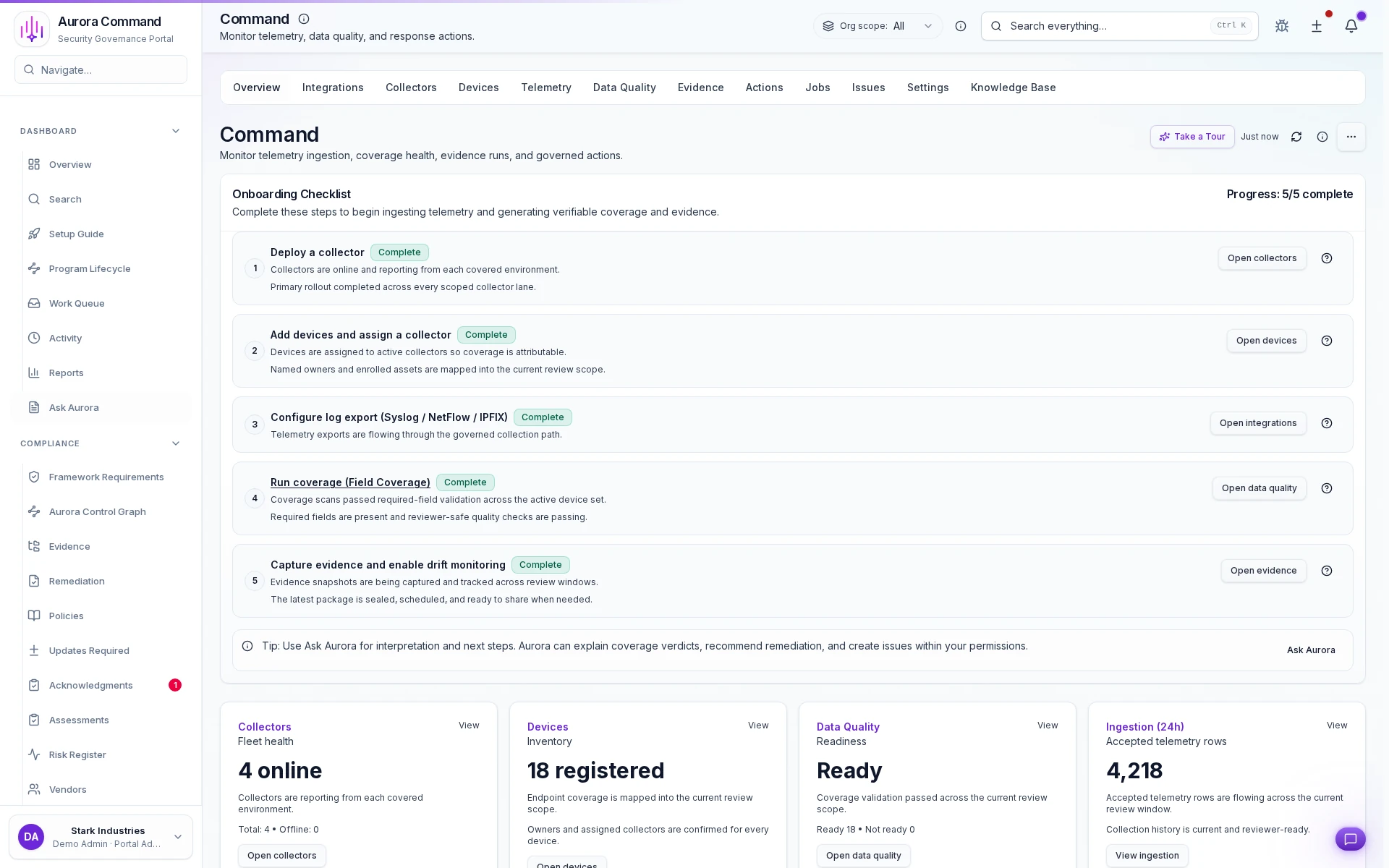
Aurora Command workspace showing telemetry-backed evidence coverage, technical proof status, and mapped requirements.
Defense Evidence Workspace

At a Glance

Defense Evidence Workspace

Controls mapped to requirements, evidence tracked with freshness, and technical proof connected to real telemetry. Everything the assessor needs, maintained continuously.

Collector-backed coverage
Telemetry-backed status
Governed export
Assessment-ready evidence Live technical proof Full requirement traceability Scoped per prime and assessor

How It Works

Three Steps. From Spreadsheets To Assessment Ready.

Aurora replaces the assessment scramble with a system that keeps your evidence maintained between review cycles.

01
Map Requirements to Controls
Import your CMMC practices, prime questionnaires, or assessment scope. Aurora maps each requirement to controls and linked evidence so gaps are visible immediately, not during the assessment.
02
Maintain Evidence Continuously
Every policy, technical artifact, and operational record gets an owner, a freshness status, and a renewal cadence. When something drifts, you know before the assessor does.
03
Share to the Right Reviewer
Package the exact evidence needed for C3PAOs, primes, or procurement reviewers. Every access is logged. Every view is scoped. No over-sharing.

From Their Side

What Your Assessor Sees When You Open Access

A structured evidence portal. Mapped requirements. Current proof. Not a file share with 200 folders and a prayer.

Mapped, Not Dumped

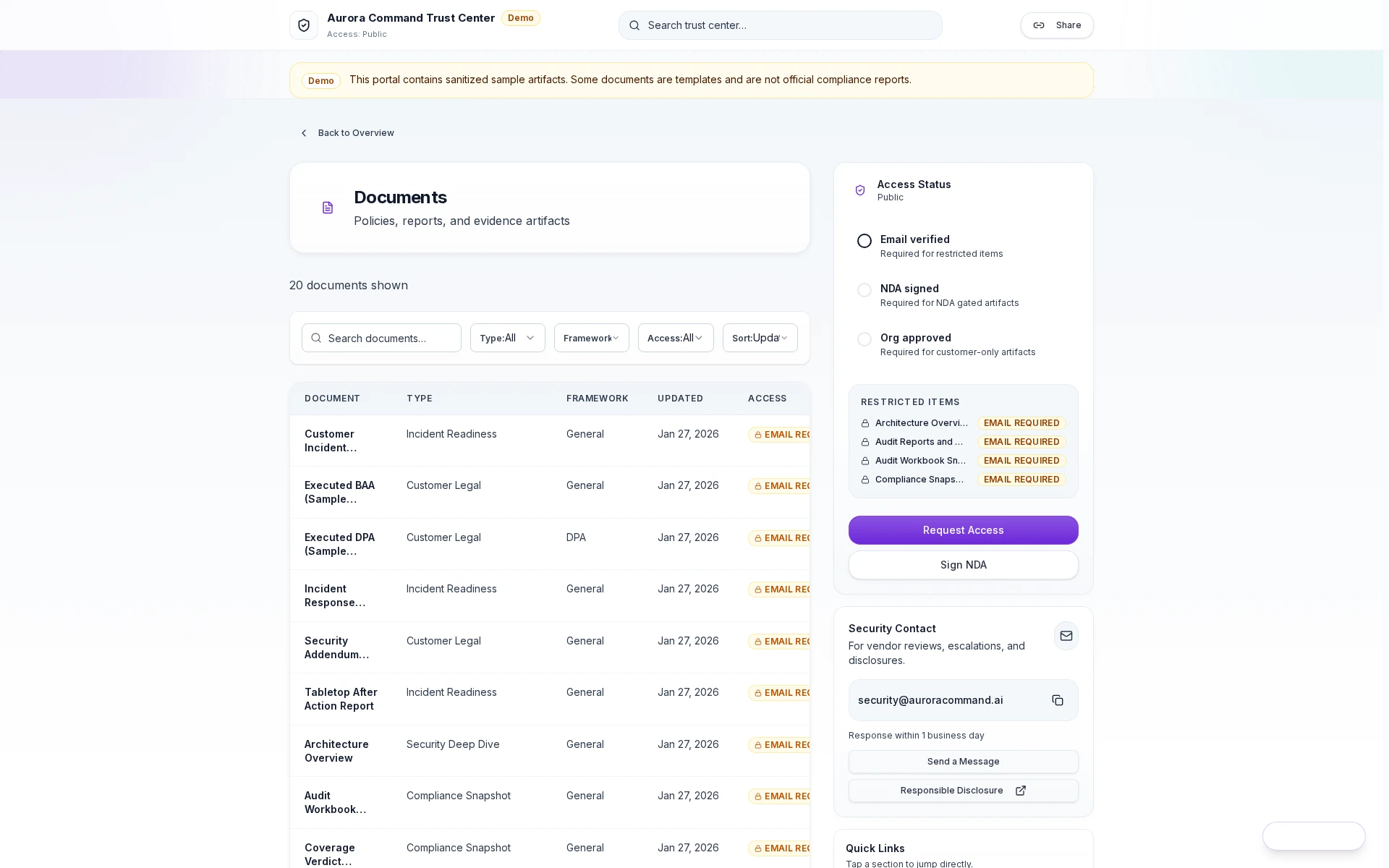
Assessors see requirements linked to controls and evidence. Not a folder tree they have to interpret themselves.

Full Access Trail

You see who reviewed what, when they downloaded, and which sections they accessed. Complete accountability.

Evidence Stays Current

When artifacts are updated in Aurora, the assessor's view reflects the change. No resending. No version mismatches between review rounds.
Aurora Trust Center portal showing structured evidence access for CMMC assessors.
Assessor Evidence Portal

Common Questions

What Defense Teams Ask Before They Buy

We're Not Ready for CMMC Level 2 Yet. Is It Too Early?
Aurora is useful before full technical coverage is in place because you can start governing policies, mapped controls, ownership, and reviewer-safe evidence now. That lets the assessment program mature from maintained proof instead of a last-minute assembly effort.
We Already Have a GRC Tool. Why Do We Need Aurora?
Your GRC tool says a control exists. Aurora shows the assessor the mapped requirement, the linked evidence, who owns it, when it was last reviewed, and whether the technical state still matches the policy. GRC tracks status. Aurora connects proof. Most teams run both.
Does Aurora Handle CUI or Export-Controlled Data?
Aurora manages the evidence trail, not the controlled data itself. It tracks what proof exists, who owns it, and whether it's current, without requiring CUI to flow through the system. Your controlled environment stays separate. Aurora organizes the proof story around it.
We Work With Multiple Primes. Each Wants Different Evidence.
That's exactly the problem Aurora solves. You maintain one evidence base. Each prime gets a scoped view of exactly the controls and proof relevant to their subcontract. No rebuilding. No cross-contamination between prime relationships.
What If Our Technical Infrastructure Isn't Fully Deployed?
Aurora creates value even without full technical coverage. Start with policy-level evidence, mapped controls, and reviewer-safe packaging. Add technical proof from Command as your infrastructure matures. Assessors want to see progress and a system, not perfection on day one.
Live walkthrough
The Assessment Window Does Not Wait For Your Evidence To Catch Up
See how Aurora keeps your defense program assessment-ready between review cycles. Evidence maintained continuously, not assembled under pressure.
Scoped walkthroughs and evidence planning aligned to your assessment motion.