One Platform for Audits, Reviews, and Renewals
Every plan includes
- Full platform from $600/mo:Governance, evidence, assessments, reviewer sharing, SSO, SCIM, and audit exports included in every plan.
- Unlimited reviewers included:External reviewers are included on every plan. No approved-domain caps or viewer-seat fees.
- Enterprise controls included:SSO, SCIM, RBAC, audit exports, SIEM sinks, and webhooks ship in every paid plan.
- Every access event logged:Views, downloads, approvals, and exports land in one timeline with verifiable audit diffs.
Per-reviewer fees
Controls mapped
Integrations classified
"Integrations classified" counts 208+ integrations reviewed for automation coverage in Aurora's compliance registry (202 connector-backed, 6 manifest-only), out of 1082 connector modules in the full technical catalog. Classification data as of Apr 28, 2026.
Match Your Next Deadline to the Right Walkthrough
Choose the Review in Front of You
Pick the deadline, request, or review in front of you. We'll show the first walkthrough to open, the capability to start with, and what to look at next.
Start with control mapping and evidence freshness so your first review cycle has clear ownership and reusable proof.
Walk Real Workflows Before You Book Time
Start With the Review in Front of You
Need a fast recommendation?
Tell Us About the Work in Front of You. We'll Point to the Best Starting Capability.
If you already know the questionnaire, audit, renewal, or procurement cycle in front of you, we can map the shortest path to the outcome Aurora should produce first.
One Best Entry Point per Capability
Governed Proof & Compliance
Start on Assessments for the fastest path to proof, approval trails, and reviewer handoffs.
Start on Evidence for the fastest path to proof, approval trails, and reviewer handoffs.
Start on Trust Center for the fastest path to proof, approval trails, and reviewer handoffs.
Start on Risk for the fastest path to proof, approval trails, and reviewer handoffs.
Start on Assessments for the fastest path to proof, approval trails, and reviewer handoffs.
Enterprise Controls & Services
Start on Enterprise Controls for the fastest path to proof, approval trails, and reviewer handoffs.
Start on Implementation & Success for the fastest path to proof, approval trails, and reviewer handoffs.
Review Operations
Start on Risk for the fastest path to proof, approval trails, and reviewer handoffs.
Start on Risk for the fastest path to proof, approval trails, and reviewer handoffs.
Start on Messaging Operations for the fastest path to proof, approval trails, and reviewer handoffs.
Start on Voice Operations for the fastest path to proof, approval trails, and reviewer handoffs.
Readiness
Start on Readiness Analytics for the fastest path to proof, approval trails, and reviewer handoffs.
Start on Simulations & Sessions for the fastest path to proof, approval trails, and reviewer handoffs.
Start on Simulations & Sessions for the fastest path to proof, approval trails, and reviewer handoffs.
Start on Readiness Analytics for the fastest path to proof, approval trails, and reviewer handoffs.
Start on Simulations & Sessions for the fastest path to proof, approval trails, and reviewer handoffs.
Start on Readiness Suite for the fastest path to proof, approval trails, and reviewer handoffs.
Start on Simulations & Sessions for the fastest path to proof, approval trails, and reviewer handoffs.
Start on Messaging Operations for the fastest path to proof, approval trails, and reviewer handoffs.
Start on Support Requests for the fastest path to proof, approval trails, and reviewer handoffs.
Command
Start on Command for the fastest path to proof, approval trails, and reviewer handoffs.
Start on Command for the fastest path to proof, approval trails, and reviewer handoffs.
Keep Deadlines, Reviewers, and Follow-Up Moving Between Reviews
More supporting surfaces
How Modules Combine into the Plans Buyers Purchase
One place to manage controls, approvals, evidence, reviewer handoffs, identity, and audit outputs.
A cleaner trust surface, structured exports, scoped access, and logged downloads instead of loose attachments.
A live view of what is current, stale, missing, or drifting before the next review hits.
Proof with clearer freshness, source context, and less manual clean-up behind every export.
Clear owners, dates, escalations, and closure evidence instead of scattered remediation threads.
Decision trails and closure outputs that make progress easier to verify.
One system for training assignments, practice exercises, incident records, and readiness scoring instead of scattered tools and spreadsheets.
A concrete story of who trained, what was practiced, and how readiness improved over time.
Coverage validation and technical proof that can stay inside the environment while still producing reviewer-safe outputs.
Higher-confidence answers to source trust, coverage, and change-control questions.
A compliant voice channel that chases vendor questionnaires, conducts audit interviews, and runs incident notification fan-outs without the manual phone work.
Voice-captured answers attach to evidence requests as first-class evidence with PII-scrubbed transcripts and source tags.
From Maintained Proof to Controlled Reviewer Handoff
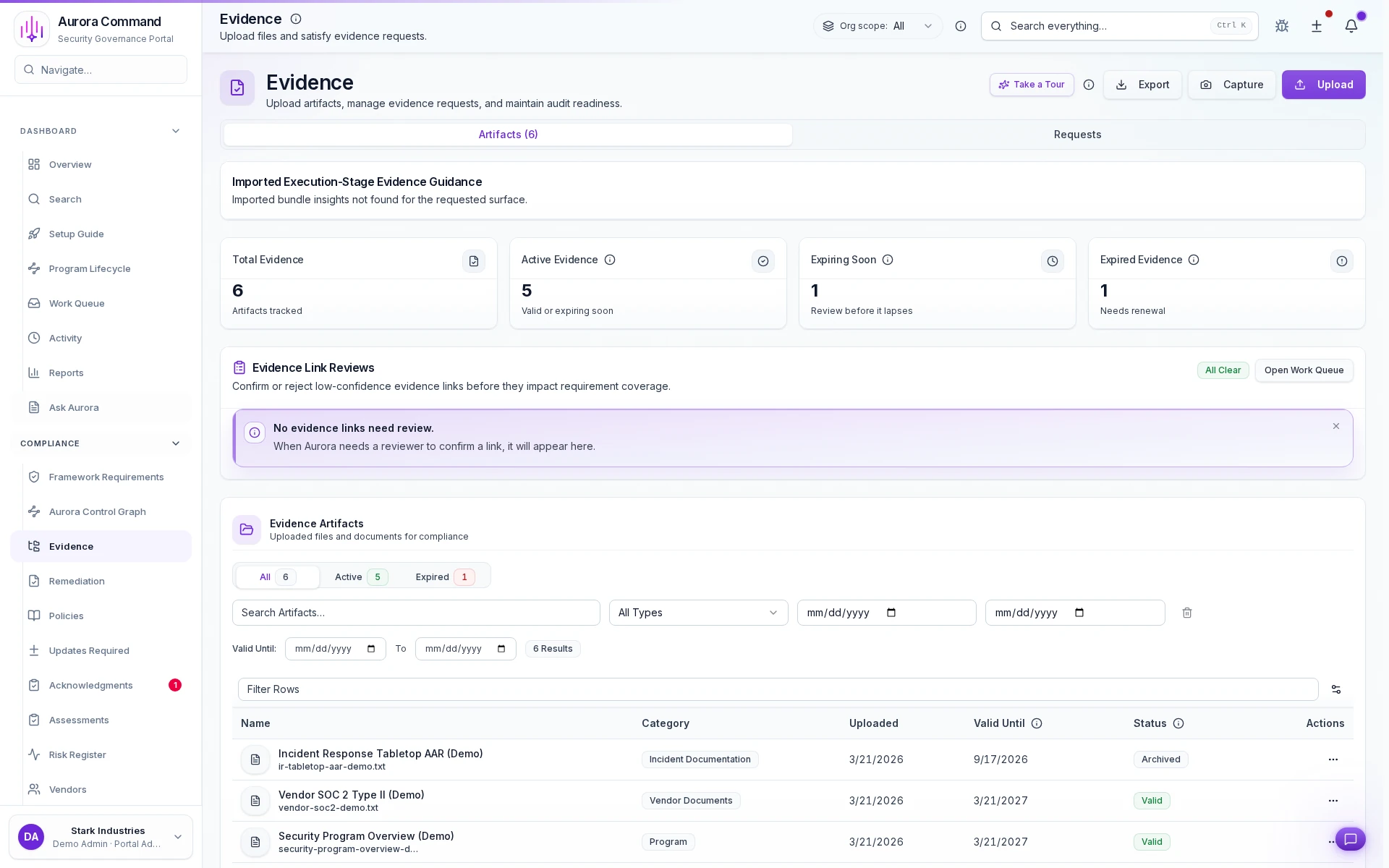
Deliver proof on demand without last-minute document chasing
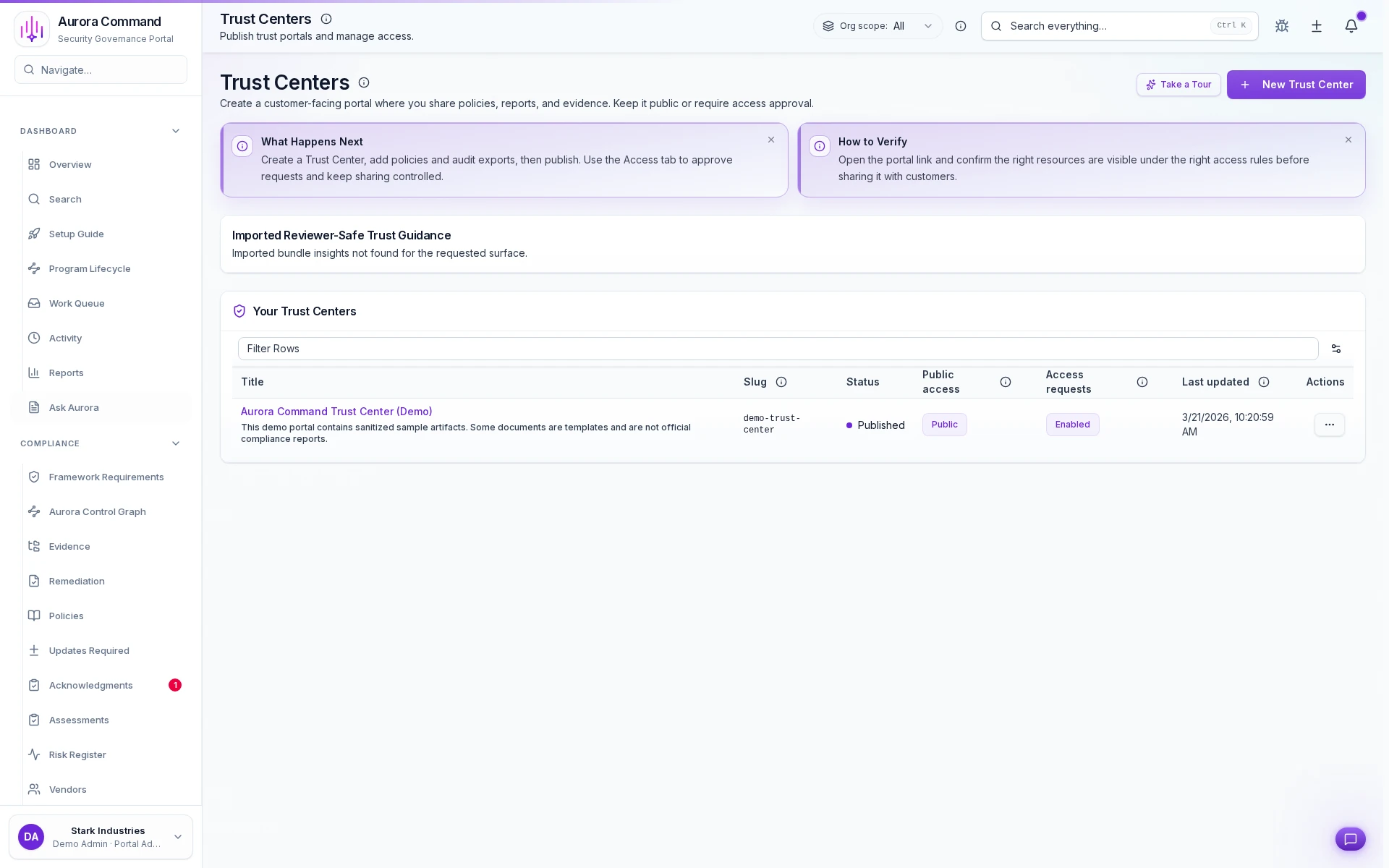
Start buyer reviews from a published, current proof surface instead of scrambling to assemble a packet under deadline pressure.
- Show the maintained trust surface buyers expect to see first.
- Keep reviewer-facing materials tied to the same proof record your team updates.
- Make follow-up requests easier because the first handoff already has structure.
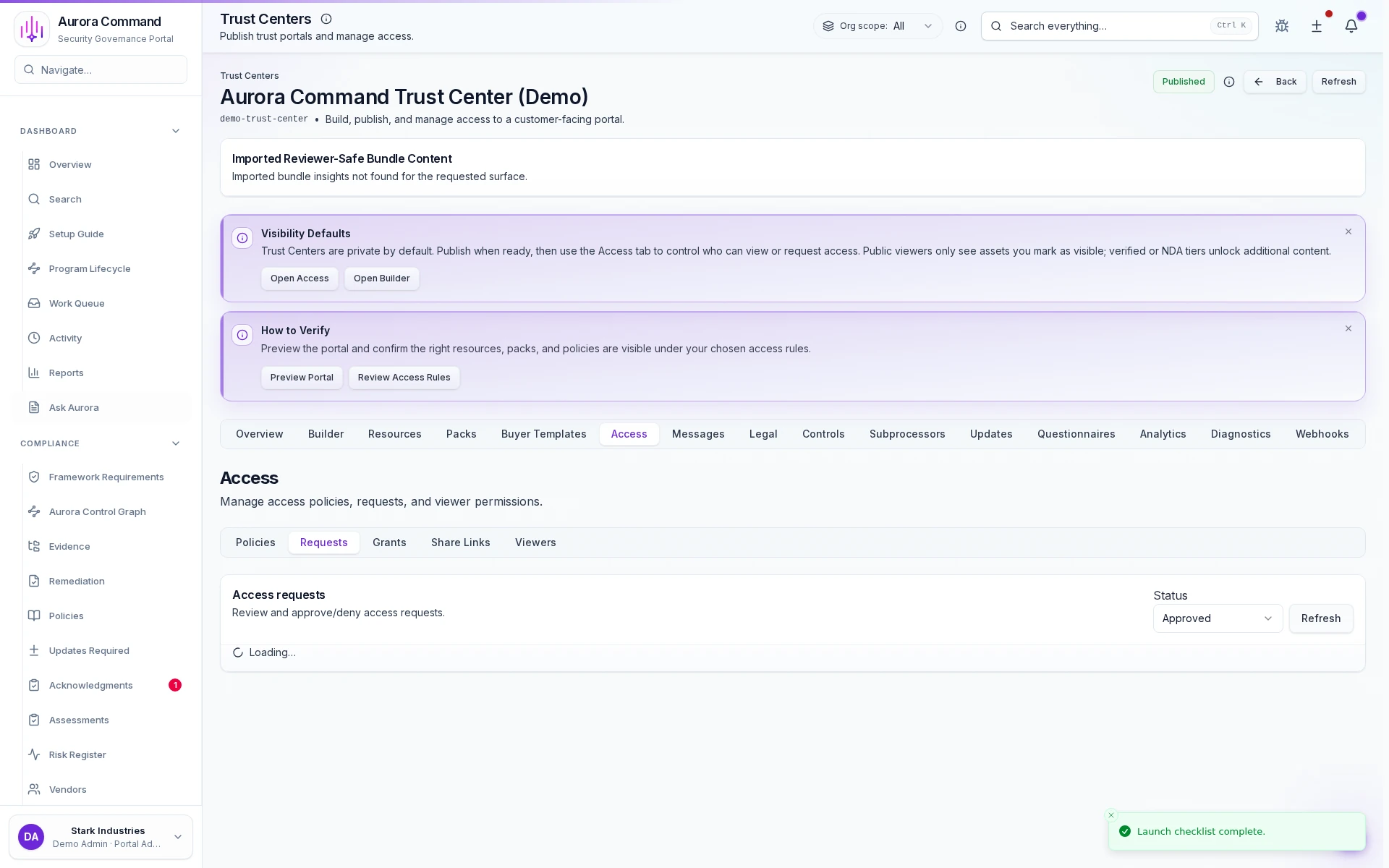
Control who sees what through request-and-approval gates
Give procurement, diligence, and audit reviewers scoped access without exposing the admin workspace behind it.
- Route sensitive materials through approval, agreement, or verification gates.
- Keep access rules visible enough that buyers understand what happens next.
- Make cross-domain reviewer sharing feel deliberate instead of improvised.
Keep proof current before anyone asks for it
Freshness, ownership, and source context stay visible in the evidence workspace so every handoff starts from maintained proof.
- See what is current, what is expiring, and what needs attention before a review starts.
- Preserve source and category context so reviewers are not guessing what each artifact means.
- Reduce last-minute cleanup because the evidence record is already organized.
Keep Every Reviewer Touchpoint Attached to the Record
When someone requests access, gets approved, or opens a shared packet, Aurora keeps that trail on the same proof surface instead of burying it in inboxes.
- Give security, procurement, and revenue teams one answer when they ask what was shared.
- Show reviewers a controlled path instead of rebuilding the handoff each time.
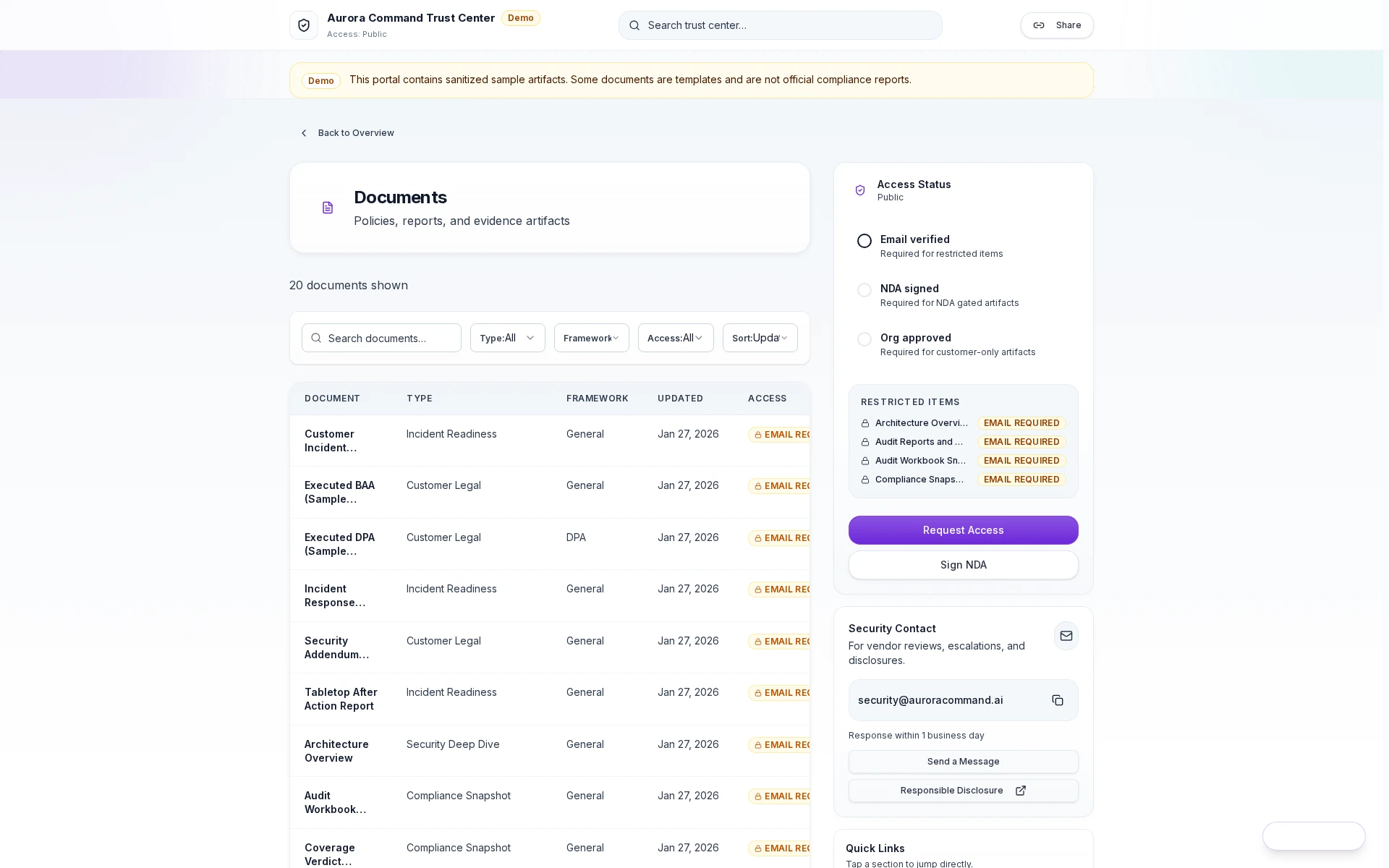
Scoped access grants
Reviewers get controlled access with tiered permissions and expiring links.