Ship Every Audit Faster with One Reusable Proof Record
Map controls once, collect evidence once, and reuse both across every audit, security review, and renewal. Aurora Command tracks freshness so proof is ready before reviewers ask.
15-minute walkthrough. No obligation. Bring your next review and we'll show the exact workflow that closes it.
- Built for auditors:Every feature is designed around what reviewers and assessors actually ask for
- Map once across frameworks:Reuse the same proof across overlapping standards and audits
- Controlled reviewer sharing:Tiered access, expiring links, and download logs stay built in
- Evidence that stays current:Automated collection and reminders keep proof review-ready
Controls, evidence, review work, and shared access in one live view instead of exported status tables.
Pick Your Biggest Compliance Bottleneck
Reduce questionnaire turnaround time
Reusable answers with citations and approvals. Drafting grounded in your evidence.
Stop stale evidence from stalling deals
Freshness tracking, assigned owners, and automated reminders flag expiring proof before reviewers find it.
Consolidate governance into one system
Controls, policies, training records, and approvals live together. Map once, reuse across every framework.
Replace vendor risk spreadsheets
Structured vendor intake, due diligence workflows, and tracked ownership replace scattered spreadsheets.
Control exactly what reviewers see
Tiered access, expiring links, and download logs give you full control over shared proof.
Prove incident readiness to insurers
Tabletop exercises and after-action records organized the way auditors and insurers expect.
Route requests with clear accountability
Structured intake, assigned owners, threaded updates, and tracked status transitions for every request.
Prove response reliability under pressure
Track acknowledgments, escalations, and communication timelines with exportable proof of response discipline.
Show readiness improving cycle over cycle
Score trends by cohort with exportable proof that readiness gains are real and measurable.
Start with one review. Expand into a repeatable workflow for every audit, renewal, and security review after that.
Five Steps That Replace Spreadsheet Chaos
This replaces spreadsheets, shared drives, and one-off review folders with one repeatable workflow.
Evidence and Access Logs Ready Before Reviewers Ask
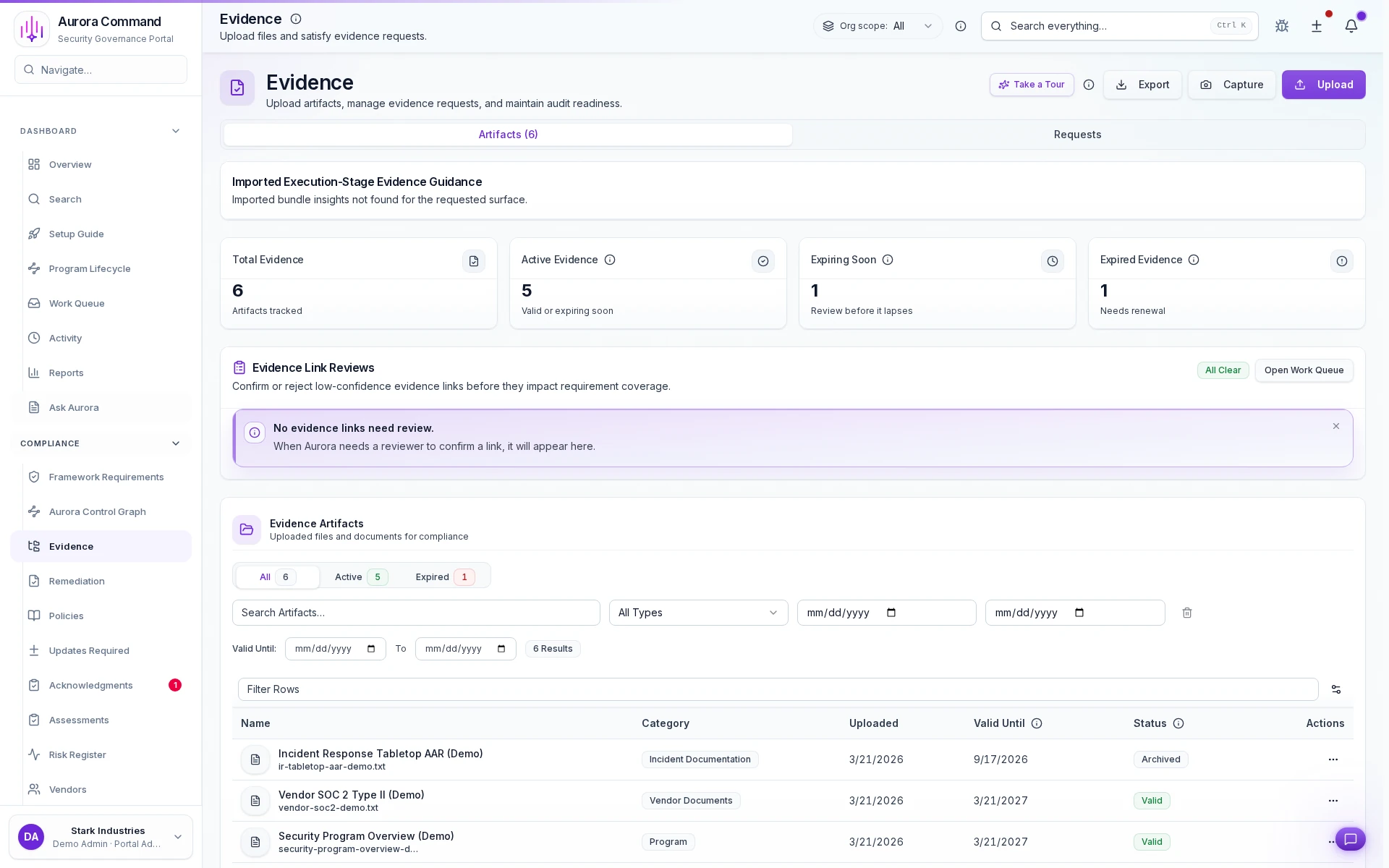
Freshness tracking per artifact
See which evidence is current, expiring, or stale at a glance.
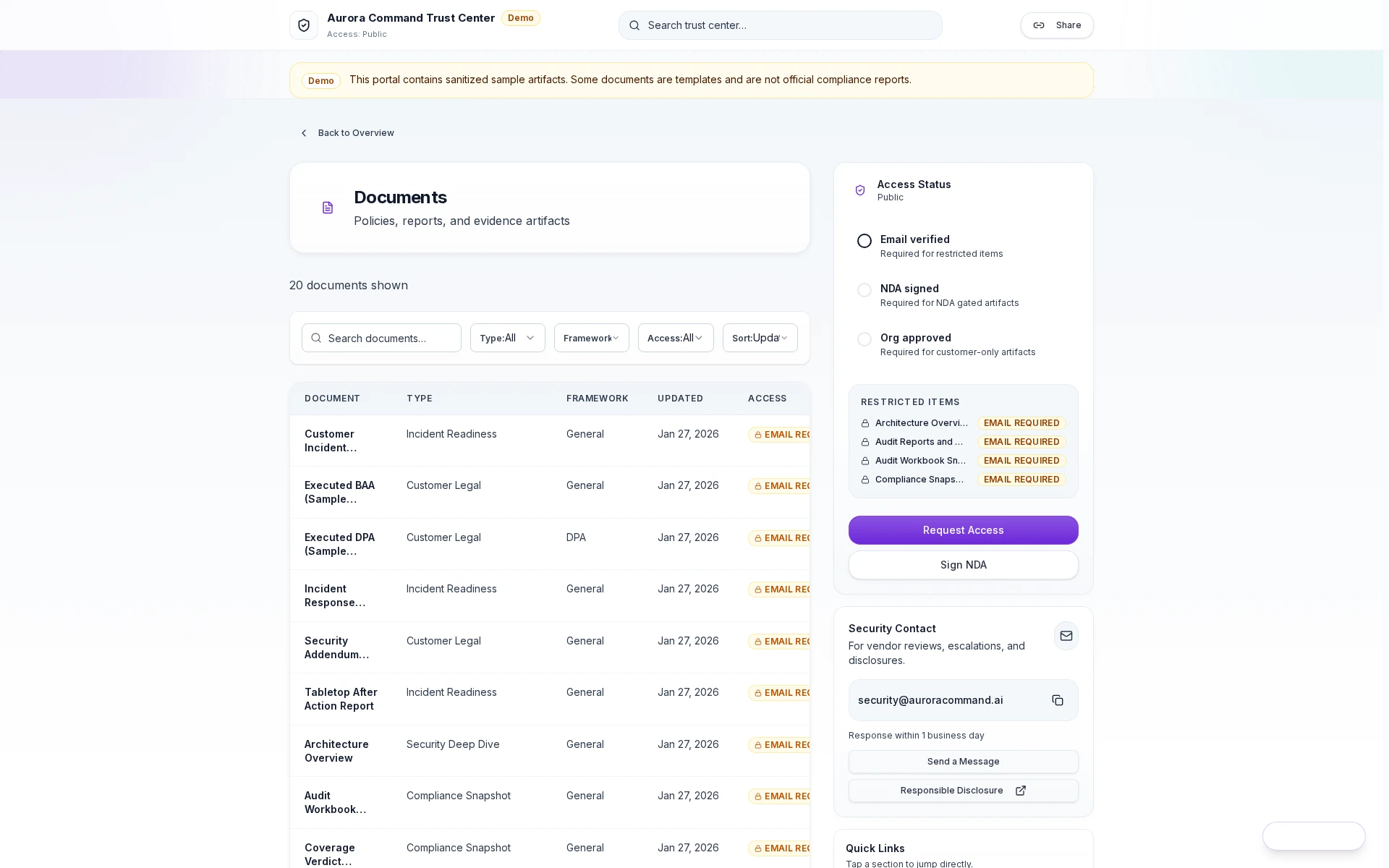
Scoped access grants
Reviewers get a controlled link with tiered permissions, not a shared login.
Training, Risk, and Incidents in One Place
Present one disciplined program to reviewers, not a patchwork of disconnected tools.
See How Aurora Handles Your Next Review
Bring a questionnaire or framework. We'll walk the full answer workflow in 15 minutes.
Questions Teams Ask Before They Buy
How do features work together?
What is automated vs. manual?
Can I control what reviewers see?
Does this replace our GRC tool?
How do we keep evidence from going stale?
Browse the Full Capability Catalog
Browse by Capability
Find a capability, see the outputs it creates, and understand what a reviewer or teammate will receive.
Close Security Reviews Faster
Evidence and Controls That Stay Current
Questionnaires That Move Deals Forward
Governance Core That Holds Up in an Audit
Incident Readiness With a Clear Paper Trail
Simulations & Sessions (Training, Tabletop, and Phishing)
See readiness at a glance, then drill into evidence.
The Executive Dashboard shows what is ready, what is stale, and what is blocking deals. Leaders get the story at a glance. Security teams drill into evidence and audit trails without switching tools.
- Identify what’s blocking questionnaires and audits
- Surface stale policies/evidence before buyers do
- Show program status without spreadsheet archaeology
- Readiness summary export (PDF)
- “What’s stale” report (CSV)