Skip to content
ISO 27001 readiness

ISO 27001 Surveillance Prep That Stays Current Year-Round

Map Annex A controls once. Keep policies, evidence, and your SoA current between surveillance audits. Show assessors exactly what changed since the last period.

Annex A control mappingContinuous ISMS governanceSurveillance-ready evidence

Where teams get stuck

Certification Was the Easy Part. Maintenance Is Where Teams Stall.

Keeping the ISMS current between surveillance audits is where most teams lose ground and budget.

Your SoA Is a Spreadsheet Nobody Trusts

Annex A mappings, justifications, and ownership sit in a spreadsheet. By the time the surveillance audit arrives, the mapping is already stale.

Surveillance Prep Takes as Long as Initial Certification

Evidence was collected last year, but owners changed and policies were updated. Nobody tracked what needs refreshing.

Governance Artifacts Live in Three Different Systems

Policies in one tool, training records in another, risk assessments in a third. Assembling the auditor package takes days.

This replaces spreadsheet-based SoAs, scattered policy folders, and manual surveillance prep checklists.

Workflow

Five Steps from Scope to Assessor Handoff

Each surveillance audit reuses the mapping, verifies evidence freshness, and shows assessors what changed.

01
Scope
Define in-scope systems, boundaries, and your ISMS scope statement. Assign control owners.
02
Map
Map Annex A controls to your control library with applicability justifications.
03
Collect
Link evidence to controls with source, owner, and freshness cadence. Policies, training, risk assessments, all tracked.
04
Operate
Run policy approvals, training assignments, and vendor reviews inside Aurora. Every action is timestamped.
05
Review
Create point-in-time snapshots for surveillance or recertification. Auditors see what changed since the last period.

Surveillance audits build on the last period instead of restarting.

Inside the platform

A Living Statement of Applicability, Not a Stale Spreadsheet
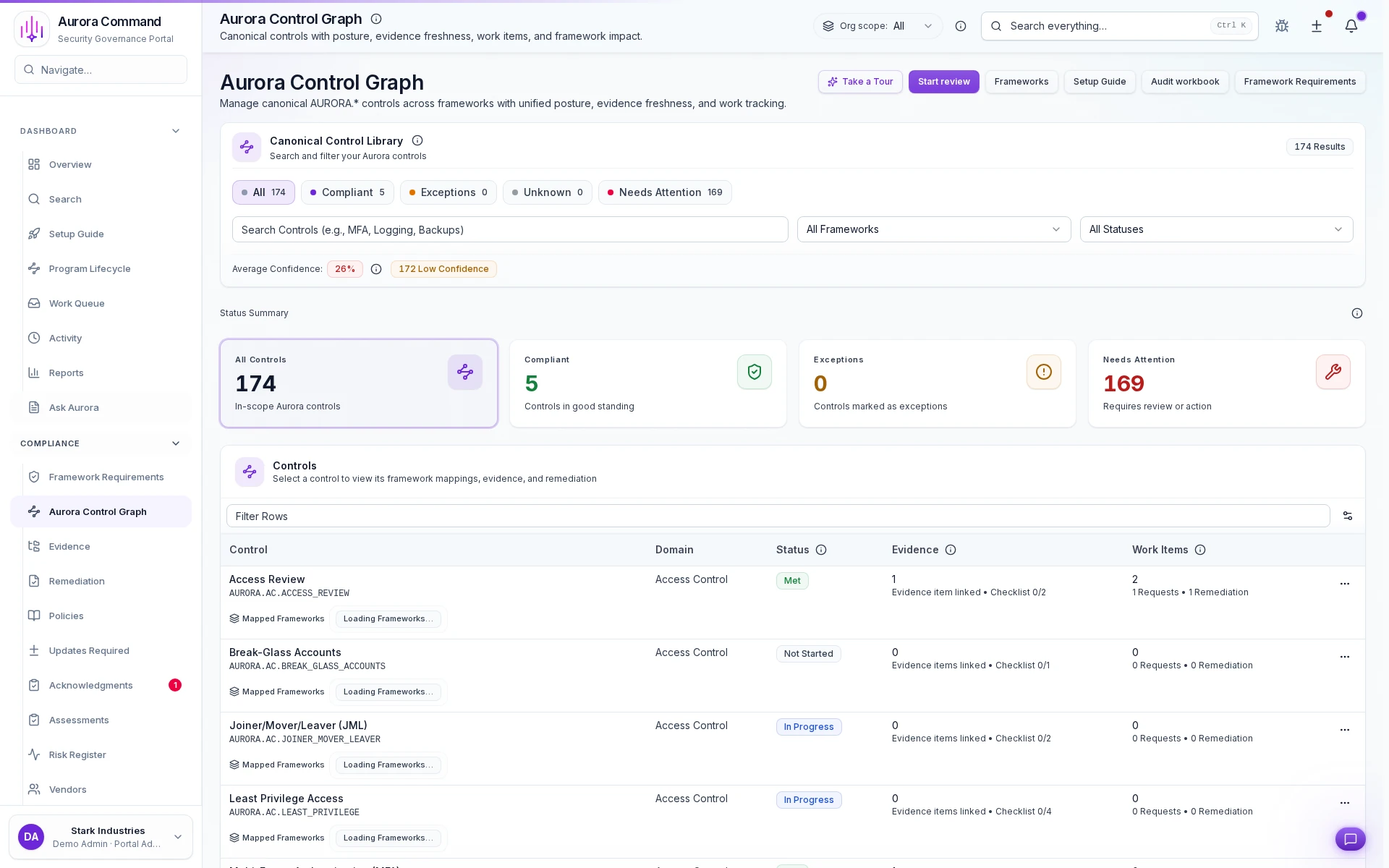
Every Annex A control shows applicability status, linked evidence, and freshness. When controls change, the SoA updates automatically.

Aurora governance workspace showing Statement of Applicability mappings, evidence, and control status.

A.5.1 · Current

Information Security Policies · Applicable · 3 linked evidence items keep the SoA current between surveillance audits.

Share with control

Give Assessors Exactly What They Need -- Nothing More

Share structured artifacts through Trust Center. Every view and download is logged.

Requirement mapping

Annex A controls linked to your control library and evidence. Auditors see structured applicability, not a spreadsheet.

Policy and approval history

Version, approver, and date for every policy. Auditors can verify governance without requesting exports.

Evidence with change history

Source, timestamp, owner, and freshness tracking for every artifact. What changed since the last audit is clear.

Platform

The Platform Behind Your ISMS Workflow

ISO 27001 connects to the same controls, evidence, and sharing layer you reuse for SOC 2, CMMC, and buyer reviews.

Want to See This with Your Control Mapping?

Share your ISMS scope or control list. We'll walk through the exact surveillance prep workflow mapped to your cycle.

Common questions

ISO 27001 Readiness Questions We Hear Most

Does this cover both initial certification and surveillance audits?
Yes. Initial certification uses the full mapping and evidence collection workflow. Surveillance audits reuse the same mapping and focus on what changed, like new evidence, updated policies, and closed risks. The workflow is the same, but the scope narrows.
How do we handle the Statement of Applicability?
Aurora maps Annex A controls to your control library with applicability status and justification. When controls are added or removed, the mapping updates. Your SoA stays current instead of becoming a stale spreadsheet.
Can we reuse this for SOC 2 or other frameworks?
Yes. Your control library maps to ISO 27001 today and additional frameworks later. Common controls only need to be defined once. You add requirement mappings without duplicating work.
How does the continuous improvement cycle work?
Risk assessments, remediation items, and management reviews are tracked inside Aurora. Each cycle captures what was identified, what was resolved, and what changed. Auditors see a clear improvement trail tied to controls.

Aurora Command does not guarantee compliance outcomes. It helps you organize and document the work.

Next Step

Explore the Workflow on Your Own Time

Explore the workflow first. Book time when you want your own ISMS cycle walked through end-to-end.

Live walkthrough
Stop Rebuilding Your SoA Before Every Surveillance Audit
Share your next ISMS cycle timeline. We'll show how mapping, evidence, and governance stay current between audits.
15-minute walkthrough mapped to your ISMS cycle. No obligation.